Create a webshop product from a photo
See how the assistant creates a complete product in the ShopVirge demo shop from a single photo.
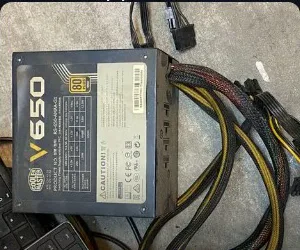
You send
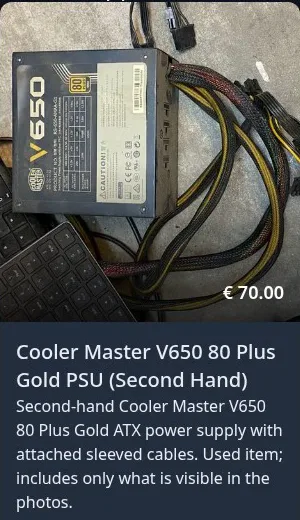
You get
- Product title
- Description
- Price incl. VAT
- SKU
- Category
- Product photo
You already have the product photos and information, but still have to describe everything by hand.
With second-hand stock every item is different. Looking up the exact model, writing a description and choosing a category takes far longer than taking the photo: easily 10 minutes per product, every time.
By hand
For every product, before it can go online:
Estimated: about 10 minutes
1 product × 10 minutes looking up details, entering text and adding photos.
- 1Read the label and identify the exact model
- 2Look up the specifications
- 3Write a title and description
- 4Pick or create a category
- 5Decide on a price incl. VAT
- 6Upload the photo and fill in the product form
With the assistant
One message in the chat:
About 3 minutes of your time
1 minute to send your photo and request, then 2 minutes to check the product. The assistant identifies the model and fills in the listing.
“Can you add this second hand PSU to my store, you can fill out all the details yourself”
Created in the demo shop
The manual times are estimates. The AI assistant times are close to what you can expect in practice. As the job gets bigger, the assistant saves you more time.
Useful when every item is different
For second-hand or one-off stock, you may have a photo long before you have a polished description. This example shows how an assistant can help turn that starting point into a catalogue entry. You still decide whether the condition, specifications and wording accurately describe the item you are selling.
What you would check before selling
- Does the model and condition match the actual item?
- Are the description, category and photo right?
- Is the price appropriate for your stock?
Questions about this demo
What if the assistant gets the model wrong?
You check every product before you sell it. The product is created in ShopVirge, so you can correct the name, specifications or description there.
Does my own photo end up on the product page?
Yes. In the recording the original photo and the drafted description appear together on the storefront page.
Is the recording sped up?
Yes, the recording is sped up so it stays short. The steps and the result in the shop are as recorded.
Where does the assistant get its facts, and can I see what it did?
In this recording, the assistant uses the product photo to identify the model and look up details. You can follow its steps in the chat. Check the model, specifications and description before you sell the product.
Do I need to know how to prompt or code?
No. You write a normal sentence, like in the recording. The assistant is connected to your shop through a standard connection (MCP). We set that up and tune the assistant’s instructions to your shop.
Does my data need to be in order first?
No. This example starts with a product photo, so you do not need a finished listing first. Moving from another shop? A separate migration assistant can read a public Shopify or WooCommerce shop and copy product texts and prices into ShopVirge.
My team worries about mistakes, or about their jobs.
You stay in charge: right model, accurate condition, right price? The assistant takes over the typing, not the decisions. It works as the account you are signed in with, so it can only do what that account may do. For staff who only need to look things up, there is a read-only assistant that cannot change anything.
Where do I even start?
With a few photos of items you sell. Bring them to a demo and we’ll look at them together.
We don’t have the expertise in-house.
You don’t have to work it out alone: we look at your photos with you, tune the assistant to your shop’s wording and rules, and discuss a setup that fits.
Can I use my own AI agent, or Claude or Codex?
Yes. ShopVirge offers a standard connection (MCP), so you can connect Claude or Codex straight to your shop, or bring your own agent. The assistant in this recording is one way to work; the same steps are available to any connected agent.
What if the assistant changes something I did not want?
ShopVirge keeps a revision history. Every change to a product, category, tag or attribute is saved as a version, including who made it and whether it came from an agent. You can go back to an earlier version, and deleted items go to a trash so they can be restored.
How many items are waiting for a listing right now?
Bring a few photos of items you sell. We will look at them with you and discuss a setup that fits your shop.
Request a demo →